Good morning, this time I will share about a program using the Java programming language in netbeans, this program you can later use to practice can learn to program database connection and can perform create update delete command. This program themed on students entering data into the database, the following screen shoot her
Selamat pagi semua, maaf sudah lama tidak membuat postingan, berhubungan tugas kuliah yang sangat banyak dan masih banyak lagi. kali ini saya akan membagikan sebuah program, program yang saya akan bagikan kali ini adalah program penjualan. yang dimana program ini bisa melakukan CRUD tentunya, apa itu CRUD, CRUD adalah program yang bisa melakukan Create Read Update Delete dan juga bisa insert juga lo. pada program ini saya menggunakan Konsep OOP, dari intervace, implement faktory, hingga entity lengkap sudah. program ini dapat kalian manipulasi kembali, terserah anda genk, jadi silahkan di download ya. berikut Screnshot nya
Good night. Today I will share a way for you how to add a new konponen in netbeans, new components that I would add is jCalender. JCalender useful to input the date to be more nudah again, if the user typically must type the date manually. JCalender useful here unttuk enter the date automatically. ok its just download jcalender here Download
after his Jcalender downloaded extract then open its netbeans program. go to the tools menu select library as shown below




after his Jcalender downloaded extract then open its netbeans program. go to the tools menu select library as shown below

next, will appear as below

first time, choose new library, and then change library name be JCalender, ok
next, select add jar/folder then enter JCalendar who have downloaded earlier

if ready, select ok. then, back to menu tool select pallete->Swing /awt

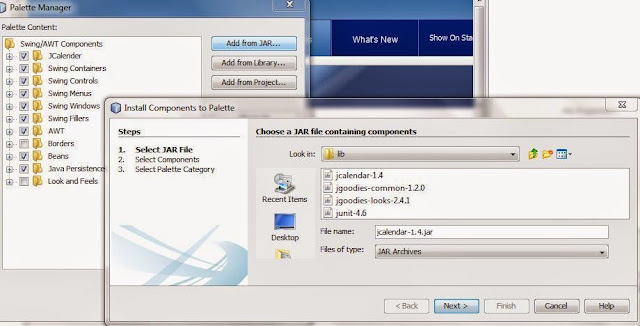
select add from jar, input the JCalender 1.4, next choice JCalender

klik next choice Swing Control and finish

finally cek the pallete dokument, JCalender has been isntalled on your netbeans

ok, thanks. happy programing gaes. and come back again :D
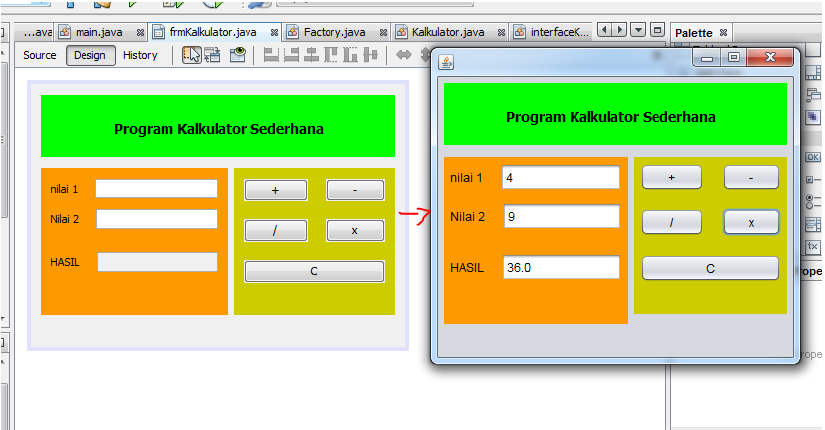
Hello Everyone , today I will make a simple calculator program using from java. This program will be able to like a program calculators that can usually clicking times, for, add, and less.
ok we just create a new project in netbeans
after we create a new project, design of a form like this
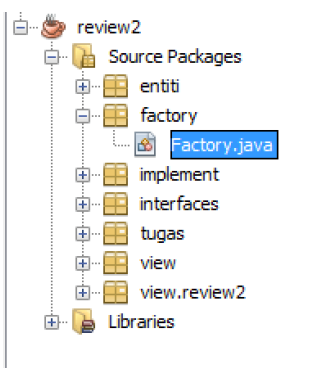
and than, create a new package like this, and reate a java class in the package factoy, name a name "factory"




ok we just create a new project in netbeans
after we create a new project, design of a form like this
and than, create a new package like this, and reate a java class in the package factoy, name a name "factory"
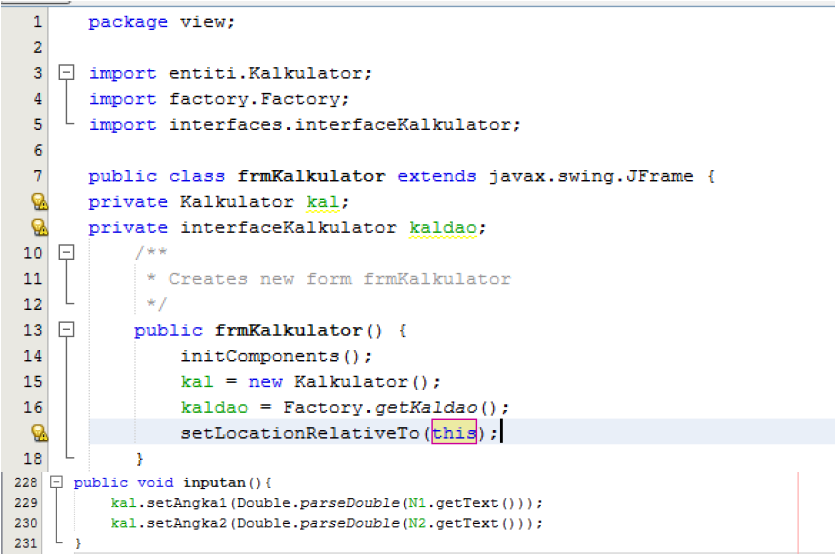
Once we've created a package and classs called factory as above, we get into the package entity and create a classs again named kalkulator.java then ok. Kalkulator.java point here is used to define a data type his calculator. Fill source code like this in class calculator.
After a well-defined data type, enter the package interface. Create javainterface by name interfaceKalkultor
Double-click on interfaceKalkulator, and enter its program code as below.
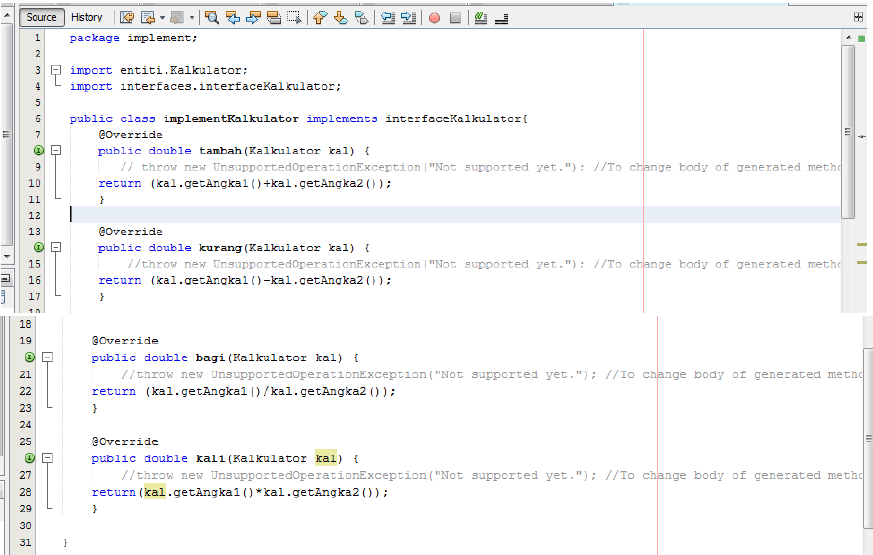
After we fill the code in the next interfaceKalkulator.java you go to implement the package, create a new clas java, and name implementKalkultor. Double-click on the implement calculator, and enter the source code below
We have finished defining interdace the next implementKalkulator.java kepackage fatory entry and double-click on factory.java earlier. Enter the code as shown below.
For the last. We entered on the form design calculator. Enter the sub menu source code, enter the code below
last orders, we return to the menu design double-click on each button, and enter the code below
ok, the calculator program has been completed, do not forget to save your project. thank you.:D
see you again
Asalamualikum, wahai para sahabat hati yang sangat baiknya. tak henti henti nya saya menanyakan kabar kalian semua, gimana kabarnya ? baik kan? jawabnya harus buaik dong hahaha.
Sedang apakah para pembaca disana ? apakah lagi nonton film sambil mendengarkan musik. atau lagi berduaan dengan pacarnya ? kalau yang jomblo ya palingan di depan komputer main game. iya kan ? hayo pasti iyo.
hari demi hari saya mengucapkan banyak banyak terimakasih kepada para pembaca. karna statistik pengunjung suudah semakin hari semakinn banyak. moga moga kedepanya lebih baik lagi ya. mohon doanya. pada kesempatan kali ini saya akan membuat sebuah postingan tentang Bahasa pemrogram java.Ya, temanya itu teman teman, terus yang mau di bahas apa ini ? yang akan kita bahas adalah bagaimana menyambungkan 1 form ke form yang lain di java menggunakan aplikasi netbeans. kalian tau semua kan netbeans, untuk tidak memperpanjang suasana. langsung saja kalian siapkan aplikasi netbeeans nya
buat sebuah projek baru bernama koneksi form setelah itu buat sebuah package baru. jika package nya sudah di buat buat sebuah 2 buah framepanel seperti gambar di bawah ini


buat sebuah projek baru bernama koneksi form setelah itu buat sebuah package baru. jika package nya sudah di buat buat sebuah 2 buah framepanel seperti gambar di bawah ini
kemudian design sebuah frame nya masing masing seperti ini
form1
form 2.
jika sudah mendesign sebuah frame seperti diatas. pada form 1 klik dua kali pada button "ke form 2" lalu masukkan kode nya seperti di bawah ini
seperti itu, pada tanda yang saya stabilo adalah nama link form ke 2 nya. lakukan yang sama pada form ke 2, tinggal kita ganti nama form nya saja, gimana ? mudah kan ? jelas dong. terimakasih sudah berkunjung